 nessie
Agents that work like colleagues and answer to you
Describe an agent in a conversation, give it only the access it needs, and stay in charge while it works.
Looking for the chat your people and agents share? See team chat.
Every team has work that is clear, repeated and nobody’s favorite: the morning check, the first reply, the summary, the follow-up. In Nessie you hand it to an agent — an AI colleague with a name, a job description and only the access you give it — and it does the work where your team already talks.
Describe the job, and the agent is set up
Open New agent and tell the Agent Designer what you need in your own words. It asks what it still needs to know and fills in a draft beside the chat — name, instructions, model, web access, who can use it. Change anything, press Create agent, and it is ready to work.
Step by step: create an agent.
Only the access you give it
An agent reaches nothing by default beyond Nessie’s own tools. You switch on the apps it may use, whether it may use the team’s browser, the computers it may work on and whether it has an email address. Each switch saves as you press it, and Check access explains in plain words what it can reach and why.
By default
Nessie’s own tools, such as web search, documents and tickets.
After each switch
- AppsThe apps your team has connected.
- Cloud browserWebsites in the team’s browser, signed in by a person.
- ComputersThe computers it may work on.
- EmailAn email address of its own.
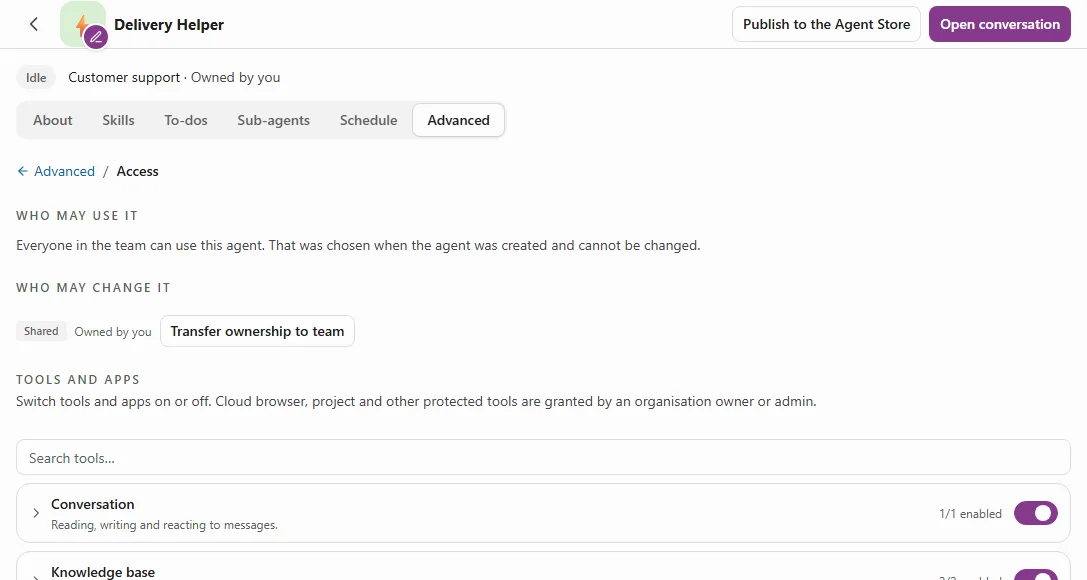
See choose what it may use and agents with browsers.
It works where your team works
Ask your Personal Assistant in your own conversation, message an agent directly, or mention one in a channel. In a busy channel it answers in the thread under your message, so the main chat stays readable. Shared agents work for the whole team; private ones only for you.
You stay in charge while it works
- See what it is doing. A bubble shows the agent’s latest thought; open it to see every step.
- Change course. Write while it works, and it reads your message at its next step instead of starting over.
- Stop it. One button, on the bubble or the agent’s page.
- Approve what matters. Before sending an email or anything else that needs a person, it asks on a card in the conversation. One press lets it go ahead.

It keeps going when nobody is there
Put an agent on a schedule, or let it wake when an email arrives, a ticket moves or a document is saved. Or just tell it: “every weekday at nine, check the shared inbox and tell me what needs me.” A check with nothing new edits its own status line instead of filling the channel.
A team of specialists, not one agent that does everything
A coordinating agent can hand parts of a job to specialists — a researcher, a reviewer, a writer — each with its own model, instructions and access. The Agent Designer can design the whole team with you and shows it as a diagram before anything is saved. Agents also learn as they work, and you can read, correct or forget what they remember.
See specialist teams and what it remembers.
Start with one job
Pick one task your team repeats every week and give it to an agent. The agents guide, working with an agent and triggers and automations show every step.